New Channel Settings Feature!
📢 FrontRow Changelog Update
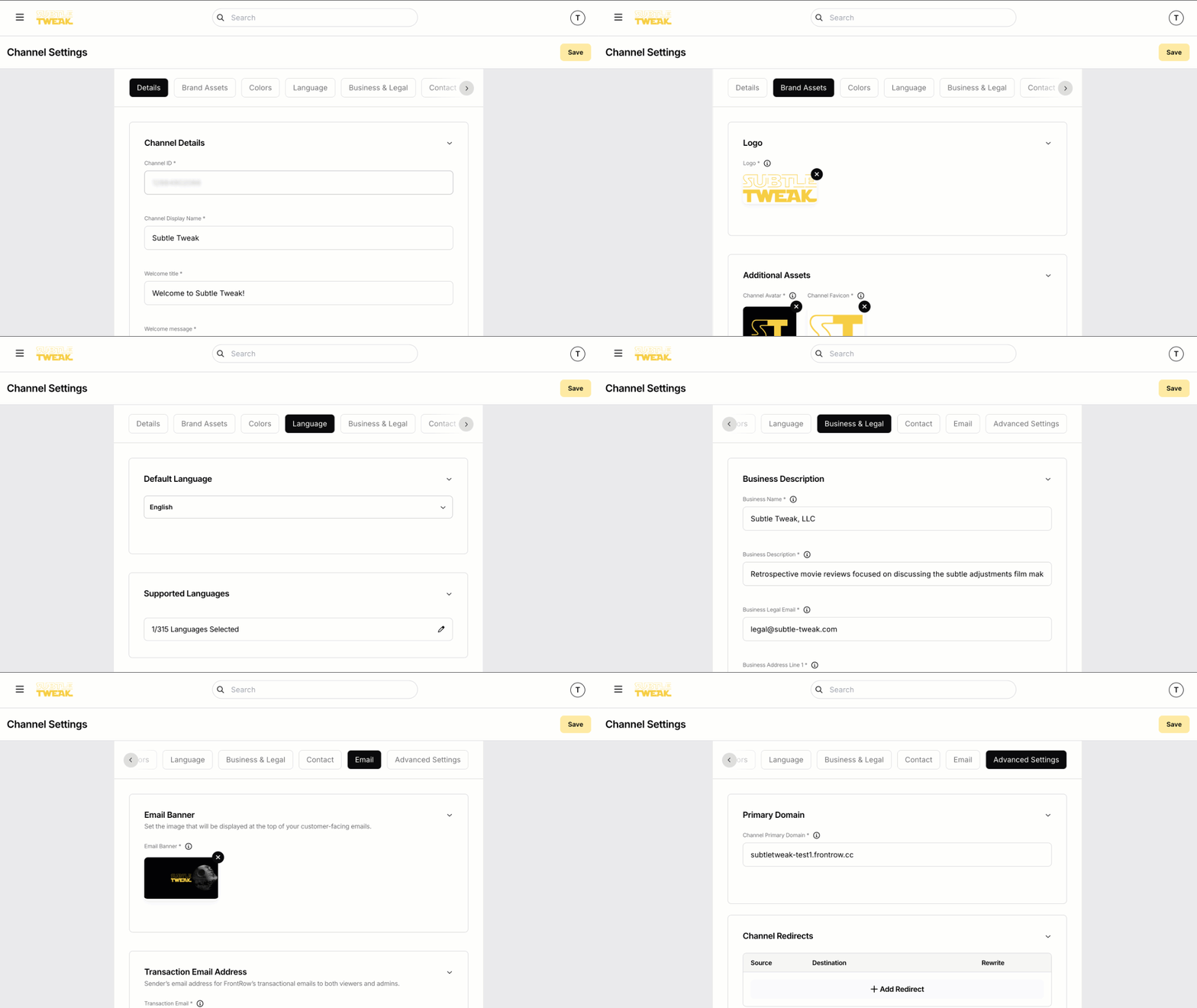
We’re excited to announce the launch of our New Channel Settings feature! Managing your FrontRow channel is now easier and more powerful than ever. Customize your channel’s appearance, brand identity, and business essentials all in one place.
What’s New?
🔧 Channel Management Made Simple
• Access all channel settings from one convenient menu.
🎨 Create Your Brand Identity
• Set your channel name, description, and an engaging trailer video.
• Upload your logo, avatar, and email banner.
• Customize brand colors to match your unique style.
💼 Business Essentials Setup
• Configure financial details like billing country and business info.
• Link terms of service, privacy policy, and contact details.
🌍 Reach a Global Audience
• Manage domains, redirects, and enable multi-language support.
🚀 Instant Publishing
• All changes go live the moment you hit “Save.”
How to Get Started:
1. Open the web app and click the hamburger menu icon.
2. Select Channel Settings from the side navigation.
3. Explore the tabs to set up your channel exactly how you want!
💡 Need Help?
Check out our Channel Customization Guide for a step-by-step walkthrough. Got feedback? We’d love to hear from you!
Stay tuned for more updates and improvements! 🎉